> ## Documentation Index
> Fetch the complete documentation index at: https://docs.runway.com/llms.txt
> Use this file to discover all available pages before exploring further.
# Formulas basics
> Formulas define the logic behind drivers in Runway, from connected actuals to forecast assumptions.
Formulas are how drivers calculate values over time. Use them when you want a value to come from source data, other drivers, database rows, time-based logic, or a repeatable assumption instead of a manual entry.
## Where to write formulas in Runway
There are four primary places where you interact with formulas in Runway. Each has its own context depending on whether you are working with standalone drivers, databases, or HRIS data.
### Driver table blocks
When working in a [driver table block on a page](/concepts/pages/drivers-table-block) or in a [model](/concepts/models/models-basics), you often write or update formulas for the drivers you see there.
A driver table block can contain drivers created directly in the block, pulled from other driver table blocks, or drivers originating from databases. Because drivers are portable, editing a formula in one place changes it everywhere that driver is used.
You can access a driver's formulas from the formula columns, the formula button next to the driver name, or the driver's details pane. See [Keyboard shortcuts](/get-started/keyboard-shortcuts) for formula-column shortcuts.
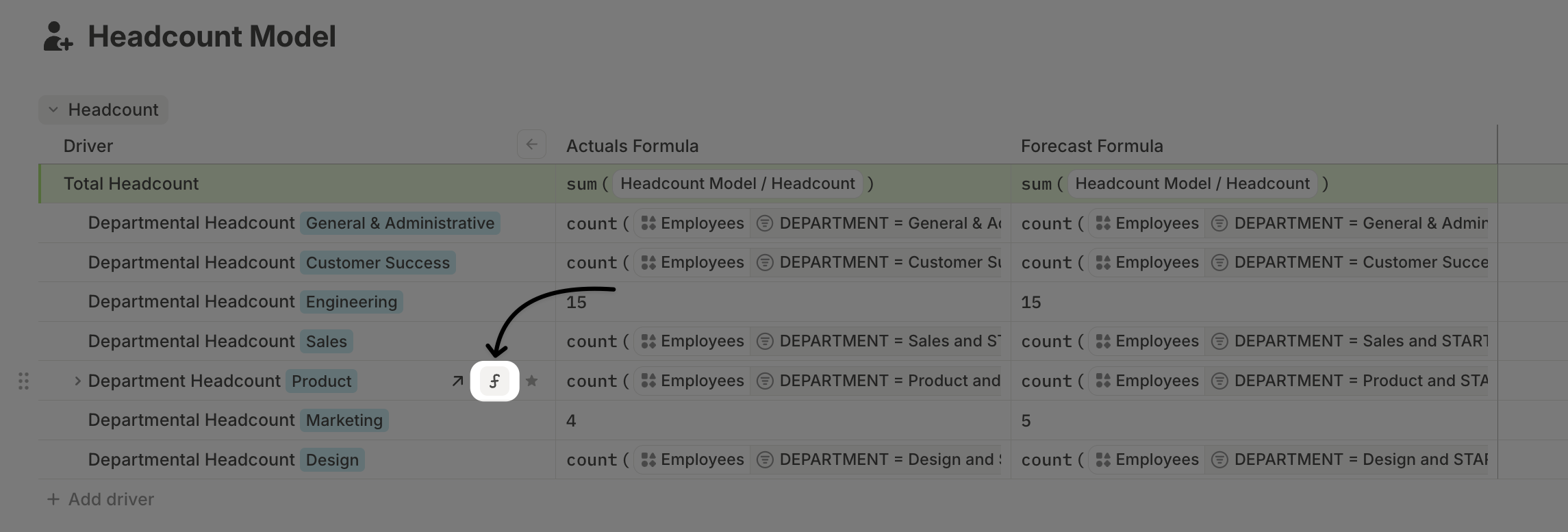 The [driver details pane](/concepts/drivers/driver-details-pane) gives you more room to work and more context on the driver.
### Driver default column formulas in a database
Most databases in Runway contain one or more driver columns. These columns can be:
* Auto-generated through [database configuration](/concepts/databases/databases-basics#configuring-a-database)
* Manually added to extend the database with calculated drivers
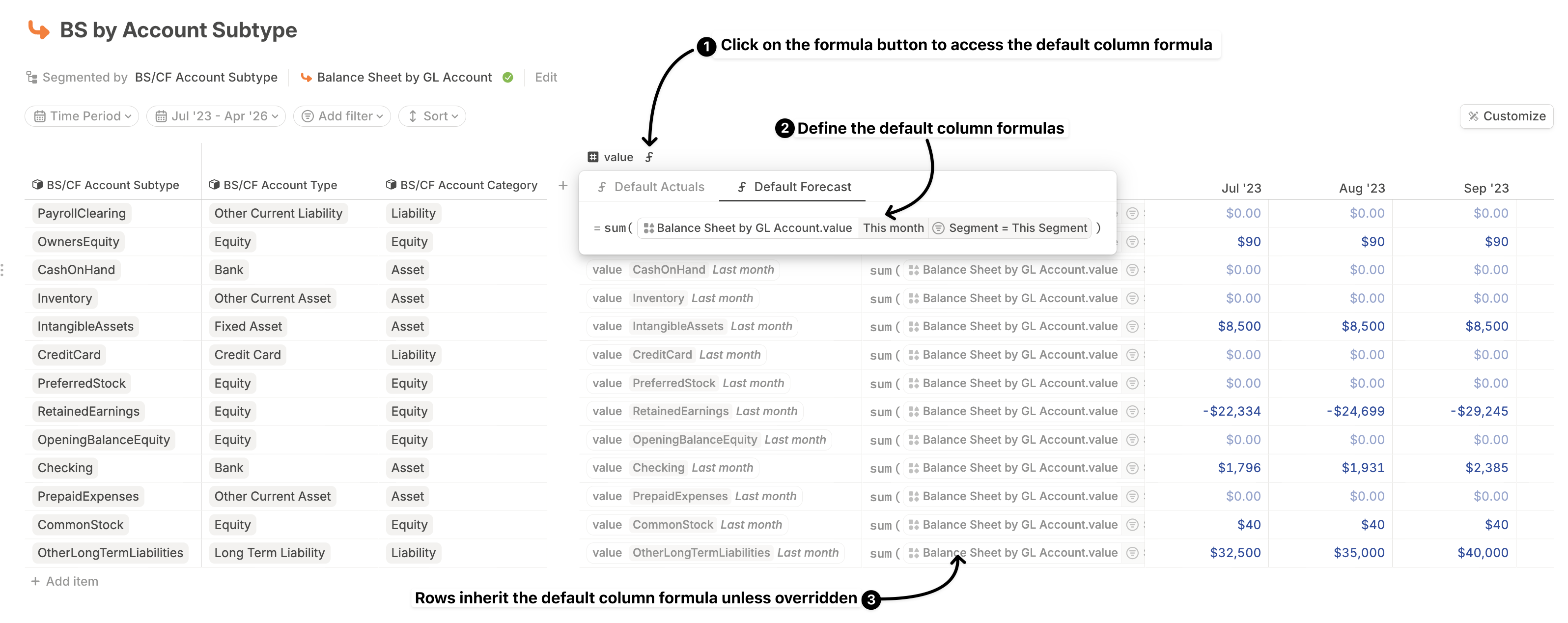
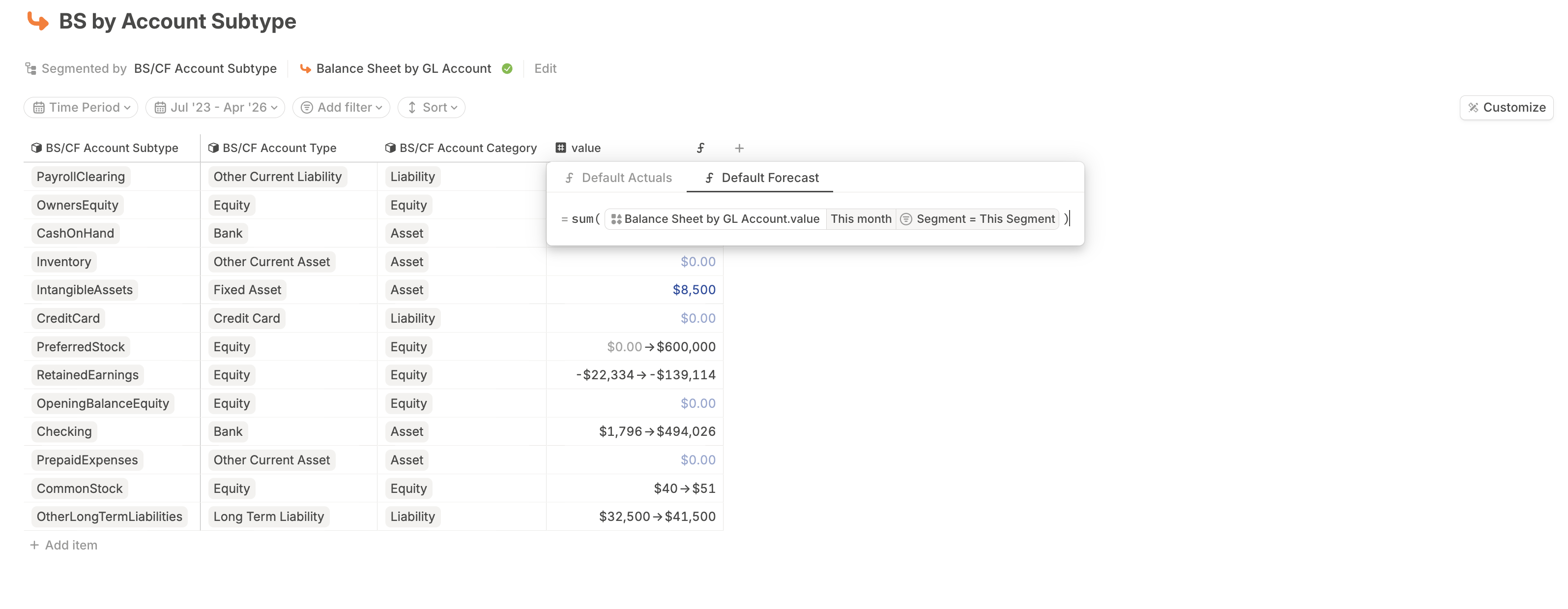
No matter how a driver column is created, it supports [default actuals and forecast formulas](/concepts/databases/formulas-in-databases#default-formulas). These are set at the column level and apply to all rows unless a specific row has an override.
You can view or edit the default formula when displaying a driver column as a time series or as a single value.
The [driver details pane](/concepts/drivers/driver-details-pane) gives you more room to work and more context on the driver.
### Driver default column formulas in a database
Most databases in Runway contain one or more driver columns. These columns can be:
* Auto-generated through [database configuration](/concepts/databases/databases-basics#configuring-a-database)
* Manually added to extend the database with calculated drivers
No matter how a driver column is created, it supports [default actuals and forecast formulas](/concepts/databases/formulas-in-databases#default-formulas). These are set at the column level and apply to all rows unless a specific row has an override.
You can view or edit the default formula when displaying a driver column as a time series or as a single value.
 ### Row-level driver formulas in a database
Rows in a driver column inherit the default column-level formulas by default. You can override the formula for a specific row when one segment needs custom logic.
You can do this by editing the row's formula cell when a driver column is shown as a time series, or by using the full time series view of a database to scan and edit multiple overrides in one place.
### Row-level driver formulas in a database
Rows in a driver column inherit the default column-level formulas by default. You can override the formula for a specific row when one segment needs custom logic.
You can do this by editing the row's formula cell when a driver column is shown as a time series, or by using the full time series view of a database to scan and edit multiple overrides in one place.
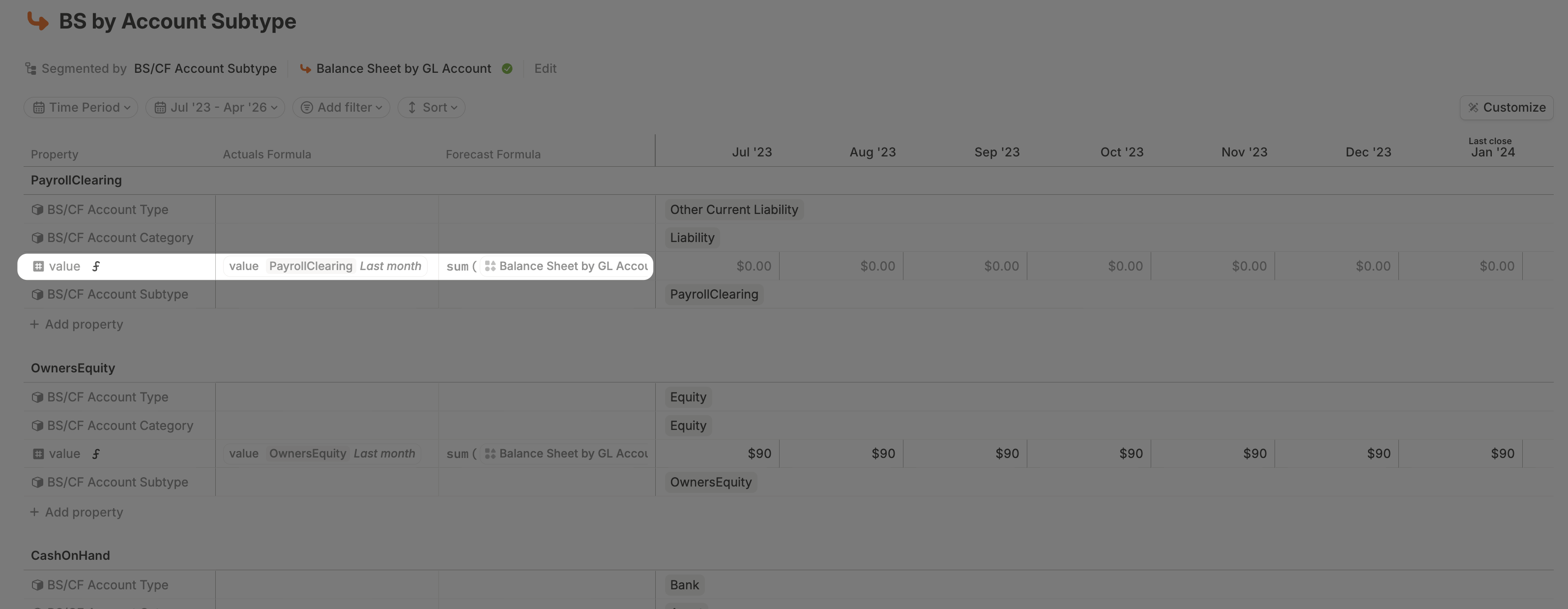 Formula overrides at the row level take precedence over the column default for that row only. Clear the override to revert to the inherited column formula.
### Field column formulas in an HRIS database
HRIS databases behave differently from standard Runway databases. You can define formulas at the column level, but row-level formula overrides are not currently supported.
That means the logic you define for a field column applies uniformly across all employees in the database. Learn more in [HRIS databases](/concepts/databases/hris-databases).
## Forecast vs. actuals formulas
Every driver in Runway supports two formulas:
* **Actuals formula:** Used for all months up to and including your [last close date](/concepts/last-close).
* **Forecast formula:** Used for all months after last close.
This split separates how historical values are calculated from how future assumptions are modeled. If an actuals formula is not explicitly set, Runway falls back to the forecast formula according to [formula inheritance logic](/concepts/drivers/drivers-basics#formula-inheritance).
## What's next
* [Formulas syntax](/concepts/formulas/formulas-syntax)
* [Functions & operators](/concepts/formulas/functions-operators)
* [Troubleshooting errors](/reference/errors-troubleshooting)
Formula overrides at the row level take precedence over the column default for that row only. Clear the override to revert to the inherited column formula.
### Field column formulas in an HRIS database
HRIS databases behave differently from standard Runway databases. You can define formulas at the column level, but row-level formula overrides are not currently supported.
That means the logic you define for a field column applies uniformly across all employees in the database. Learn more in [HRIS databases](/concepts/databases/hris-databases).
## Forecast vs. actuals formulas
Every driver in Runway supports two formulas:
* **Actuals formula:** Used for all months up to and including your [last close date](/concepts/last-close).
* **Forecast formula:** Used for all months after last close.
This split separates how historical values are calculated from how future assumptions are modeled. If an actuals formula is not explicitly set, Runway falls back to the forecast formula according to [formula inheritance logic](/concepts/drivers/drivers-basics#formula-inheritance).
## What's next
* [Formulas syntax](/concepts/formulas/formulas-syntax)
* [Functions & operators](/concepts/formulas/functions-operators)
* [Troubleshooting errors](/reference/errors-troubleshooting)