> ## Documentation Index
> Fetch the complete documentation index at: https://docs.runway.com/llms.txt
> Use this file to discover all available pages before exploring further.
# Deel
> Connect Deel to Runway to automatically sync your employee data. Keep your workforce information up to date and easily incorporate headcount and salaries into your financial models.
Runway currently supports connecting to only one HRIS account at a time. For multi-entity setup across systems, see [Multi-entity integrations](/integrations/multi-entity-integrations).
## Connecting to Deel
Follow these steps to integrate **Deel** with Runway and automatically sync your HR data: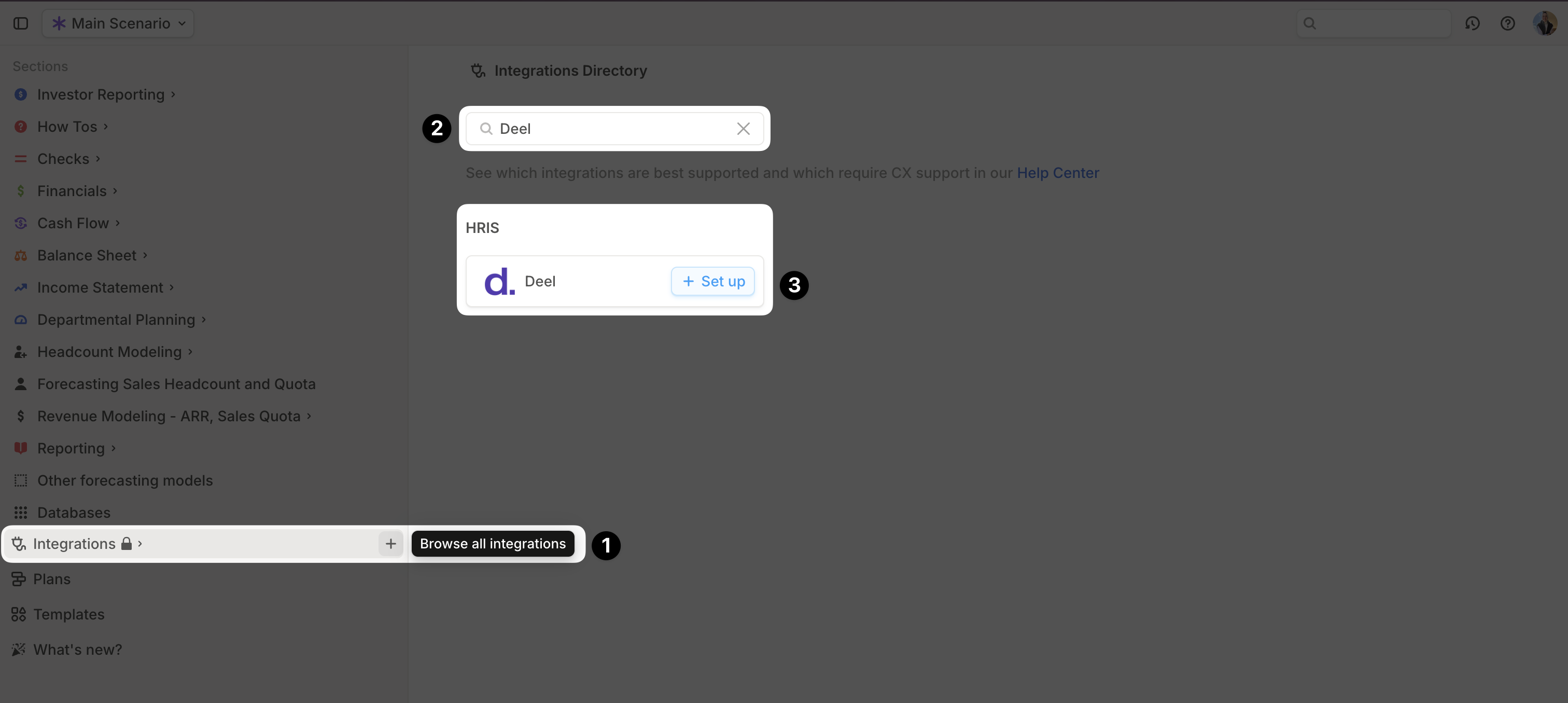 1. Open your [Runway instance](https://app.runway.com/).
2. In the sidebar, hover over Integrations and click the **+** button to open the **Integrations Directory**.
3. Search for **Deel** and click **+ Set up** under the **HRIS** option.
4. Choose your authentication method:
* **Use my credentials (recommended)** – Follow the prompts to be redirected to Deel’s website and complete authentication.
* **Use my API key or access token** – Follow the onscreen instructions to generate an API key.
5. Once authentication is complete, a confirmation message will appear, and the initial sync will begin automatically.
6. When the sync is finished, a new **Employee database** will appear in your Runway sidebar, containing the imported data.
## Deel supported data
Runway automatically imports the following data from **Deel.**
| Data name | Example | Runway data type |
| ---------------- | ----------------- | ----------------- |
| Name | John Smith | *Name* |
| Title | Software Engineer | *Dimension Field* |
| Team | Engineering | *Dimension Field* |
| Pay Rate | \$100,000 | *Number Field* |
| Pay Period | YEAR | *Dimension Field* |
| Pay Currency | USD | *Dimension Field* |
| Type | SALARIED\_FT | *Dimension Field* |
| Office | Remote | *Dimension Field* |
| Department | Engineering | *Dimension Field* |
| Start Date | Jul 1, ‘24 | *Date Field* |
| Termination Date | Jan 1, ‘25 | *Date Field* |
## Deel FAQs
Only in how they verify your identity. Both methods provide a complete sync of the data listed above.
No, Runway supports **read-only** integrations. No data is written back to Deel.
Runway currently only syncs **base salary** values for each employee.
Runway supports only one active HRIS connection at a time. For the current multi-entity limitation, see [Multi-entity integrations](/integrations/multi-entity-integrations).
1. Open your [Runway instance](https://app.runway.com/).
2. In the sidebar, hover over Integrations and click the **+** button to open the **Integrations Directory**.
3. Search for **Deel** and click **+ Set up** under the **HRIS** option.
4. Choose your authentication method:
* **Use my credentials (recommended)** – Follow the prompts to be redirected to Deel’s website and complete authentication.
* **Use my API key or access token** – Follow the onscreen instructions to generate an API key.
5. Once authentication is complete, a confirmation message will appear, and the initial sync will begin automatically.
6. When the sync is finished, a new **Employee database** will appear in your Runway sidebar, containing the imported data.
## Deel supported data
Runway automatically imports the following data from **Deel.**
| Data name | Example | Runway data type |
| ---------------- | ----------------- | ----------------- |
| Name | John Smith | *Name* |
| Title | Software Engineer | *Dimension Field* |
| Team | Engineering | *Dimension Field* |
| Pay Rate | \$100,000 | *Number Field* |
| Pay Period | YEAR | *Dimension Field* |
| Pay Currency | USD | *Dimension Field* |
| Type | SALARIED\_FT | *Dimension Field* |
| Office | Remote | *Dimension Field* |
| Department | Engineering | *Dimension Field* |
| Start Date | Jul 1, ‘24 | *Date Field* |
| Termination Date | Jan 1, ‘25 | *Date Field* |
## Deel FAQs
Only in how they verify your identity. Both methods provide a complete sync of the data listed above.
No, Runway supports **read-only** integrations. No data is written back to Deel.
Runway currently only syncs **base salary** values for each employee.
Runway supports only one active HRIS connection at a time. For the current multi-entity limitation, see [Multi-entity integrations](/integrations/multi-entity-integrations).