> ## Documentation Index
> Fetch the complete documentation index at: https://docs.runway.com/llms.txt
> Use this file to discover all available pages before exploring further.
# Gusto
> Connect Gusto to Runway to automatically sync your employee data. Keep your workforce information up to date and easily incorporate headcount and salaries into your financial models.
Runway currently supports connecting to only one HRIS account at a time. For multi-entity setup across systems, see [Multi-entity integrations](/integrations/multi-entity-integrations).
## Connecting to Gusto
Follow these steps to connect **Gusto** to Runway and automatically sync your employee data: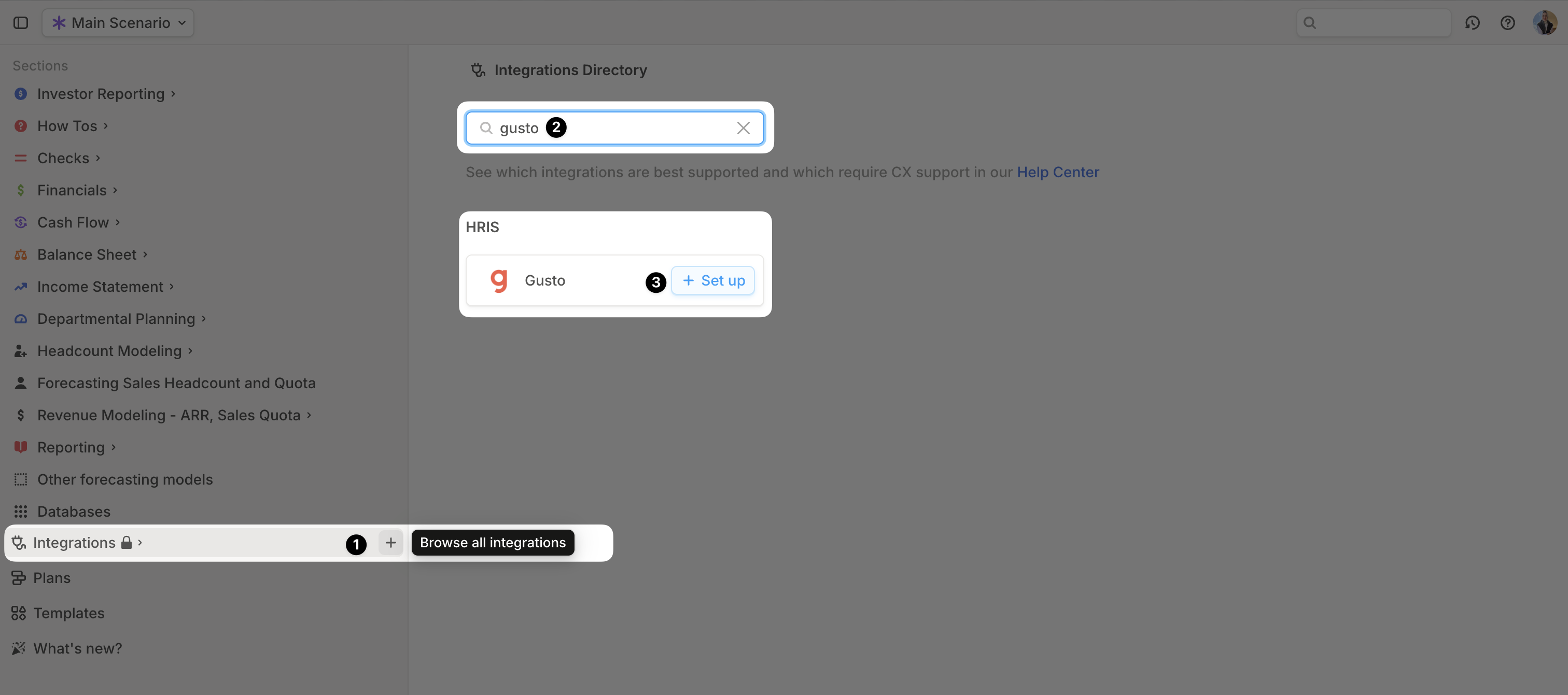 1. Open your [Runway instance](https://app.runway.com/).
2. In the left sidebar, hover over **Integrations** and click the **+** button to open the **Integrations Directory**.
3. Search for **Gusto** and click **+ Set up** under the **HRIS** option.
4. Follow the onscreen prompts to **sign into Gusto** and authorize the connection.
5. Once authentication is complete, a confirmation message will appear, and the **initial sync will begin automatically**.
6. When the sync is finished, a new **Employee database** will appear in your **Runway sidebar**, containing the imported data.
## Gusto supported data
Runway automatically imports the following data from **Gusto**.
| Data name | Example | Runway data type |
| ---------------- | ----------------- | ----------------- |
| Name | John Smith | *Name* |
| Title | Software Engineer | *Dimension Field* |
| Team | Engineering | *Dimension Field* |
| Pay Rate | \$100,000 | *Number Field* |
| Pay Period | YEAR | *Dimension Field* |
| Pay Currency | USD | *Dimension Field* |
| Type | SALARIED\_FT | *Dimension Field* |
| Office | Remote | *Dimension Field* |
| Department | Engineering | *Dimension Field* |
| Start Date | Jul 1, ‘24 | *Date Field* |
| Termination Date | Jan 1, ‘25 | *Date Field* |
## Gusto FAQs
No, Runway supports **read-only** integrations. No data is written back to Gusto.
Runway currently only syncs **base salary** values for each employee.
Runway supports only one active HRIS connection at a time. For the current multi-entity limitation, see [Multi-entity integrations](/integrations/multi-entity-integrations).
1. Open your [Runway instance](https://app.runway.com/).
2. In the left sidebar, hover over **Integrations** and click the **+** button to open the **Integrations Directory**.
3. Search for **Gusto** and click **+ Set up** under the **HRIS** option.
4. Follow the onscreen prompts to **sign into Gusto** and authorize the connection.
5. Once authentication is complete, a confirmation message will appear, and the **initial sync will begin automatically**.
6. When the sync is finished, a new **Employee database** will appear in your **Runway sidebar**, containing the imported data.
## Gusto supported data
Runway automatically imports the following data from **Gusto**.
| Data name | Example | Runway data type |
| ---------------- | ----------------- | ----------------- |
| Name | John Smith | *Name* |
| Title | Software Engineer | *Dimension Field* |
| Team | Engineering | *Dimension Field* |
| Pay Rate | \$100,000 | *Number Field* |
| Pay Period | YEAR | *Dimension Field* |
| Pay Currency | USD | *Dimension Field* |
| Type | SALARIED\_FT | *Dimension Field* |
| Office | Remote | *Dimension Field* |
| Department | Engineering | *Dimension Field* |
| Start Date | Jul 1, ‘24 | *Date Field* |
| Termination Date | Jan 1, ‘25 | *Date Field* |
## Gusto FAQs
No, Runway supports **read-only** integrations. No data is written back to Gusto.
Runway currently only syncs **base salary** values for each employee.
Runway supports only one active HRIS connection at a time. For the current multi-entity limitation, see [Multi-entity integrations](/integrations/multi-entity-integrations).